Open Source / git-browse
Developer Tool · Open Source · MIT
A git GUI that lives in your browser.
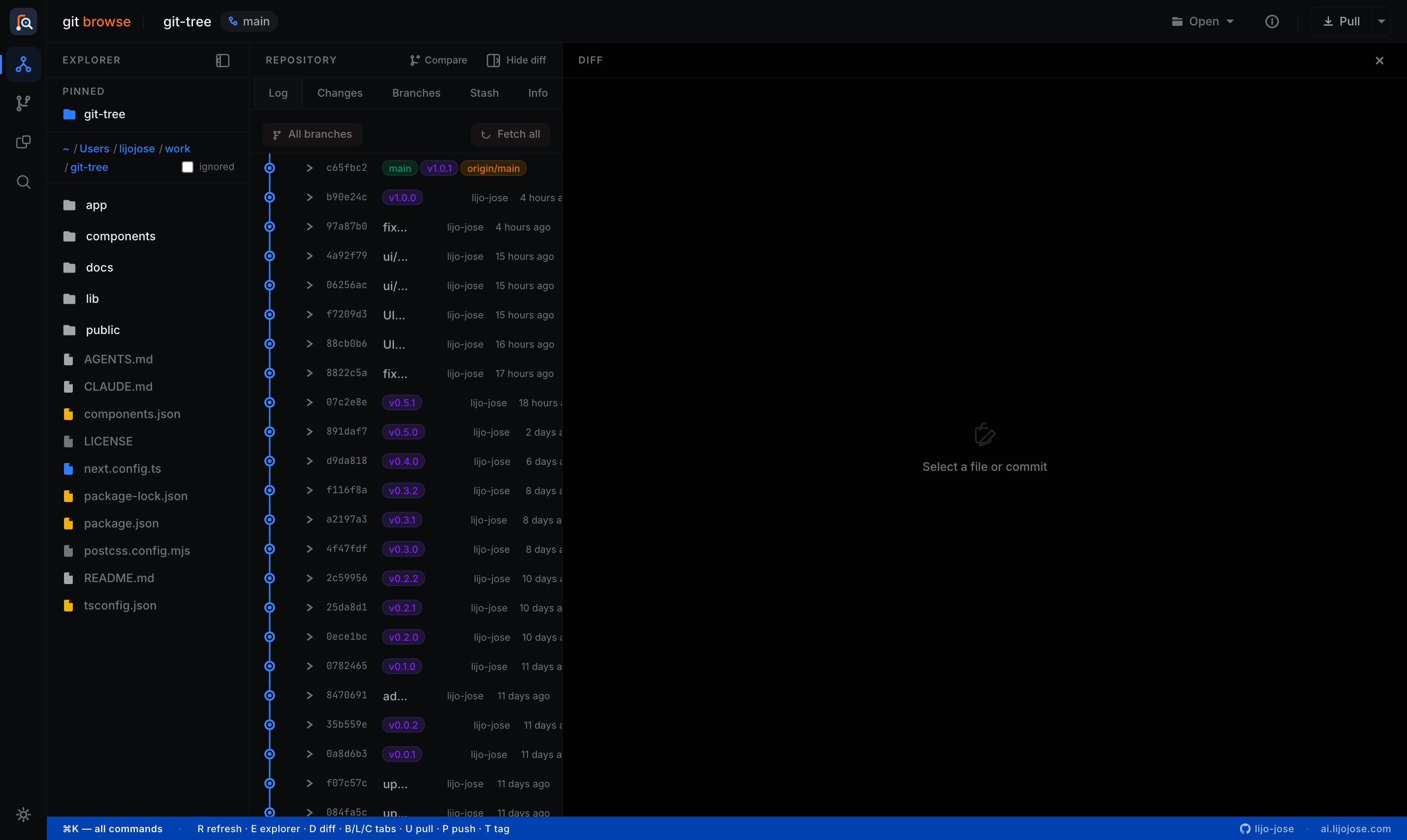
Browse commits, stage changes, manage branches, diff anything — all in a clean three-panel UI. Runs entirely on your machine. No Electron, no cloud, no account.
Self-contained bundle — extract and run node server.js. No install step.
00
Get started
Running in 30 seconds
Download release package
# Download the latest release from GitHub Releases
tar -xzf git-browse-v*.tar.gz
node server.js
# open http://localhost:3000
From source
git clone https://github.com/lijo-jose/git-browse
cd git-browse && npm install
npm run dev
# open http://localhost:3000
01
Daily workflow
Everything you touch every day
Stage, commit, push — without opening a terminal.
Stage, commit & push
Select files, write a message, and commit. The push dialog handles --set-upstream for new branches and shows the literal git command it will run.
Live sync indicator
The Sync button shows ↓2 ↑1 in real time. Click to pull; the caret reveals Fetch and Push. Refreshes on focus and every 60 seconds.
Commit graph
Visual graph with branch decorations and tag diamonds. Click a commit to expand its changed files; click a file to see the diff.
Discard changes
Per-file discard with a confirmation dialog that names exactly what will happen — no accidental data loss.
02
Branches & history
Real branch management
Not just a list — a map of how the whole repo is connected.
Divergence badges
Every branch shows ↑N ↓N against your current HEAD at a glance. No more git log --graph archaeology.
Checkout, merge, rebase
Right-click any branch for a full context menu. Destructive actions confirm and show what they'll do.
Interactive rebase
Reorder, squash, reword, and drop commits using buttons — no editing pick-lists in vim before a code review.
Stash & tags
Push, apply, pop, and drop stashes from a dedicated tab. Create and push release tags from Branches in one dialog.
03
Comparison toolkit
Diff anything
Three tools — git compare, folder compare, and a standalone diff — all sharing one renderer.
Git Compare
Pick any two refs — branches, tags, commit SHAs, or HEAD. See the full changeset: every file with +/− counts and filtering for large diffs.
Folder Compare
Walk two directory trees and classify every file as modified, left-only, right-only, or identical. Ignore patterns keep noise out.
File & clipboard diff
Drop two files or paste two text blobs and get an instant diff. Useful for JSON responses, YAML configs, or anything without a path.
Unified renderer
One diff view across every tool — unified or split, word wrap on demand. Learn it once, use it everywhere.
04
Search & insights
Understand any codebase
Server-side search and a full analytics dashboard, available for any local directory.
Repo-wide grep
Search file contents across any directory — case-insensitive or regex. Results grouped by file with line numbers and match counts.
File finder
Find files by name or glob (*.ts, config*) anywhere on disk. Doesn't require the folder to be a git repo.
Insights dashboard
Commit heatmap, branch network graph, top contributors, hotspot files by churn, and commit-type breakdown for any repo.
Explorer groups
Pin repos and organise them into named, collapsible groups. Active branch name visible in the sidebar without opening a repo.
05
Workspace & settings
A proper multi-repo workspace
Manage git identity, remotes, and sync behaviour — all without touching the terminal.
Git Identity
View and set user.name and user.email with local or global scope. Shows whether values came from local config, global config, or are unset — so you always commit under the right name.
Remotes manager
Full CRUD for your remote list: view fetch and push URLs, edit in place, add a new remote, or remove one with a two-step confirm. Everything git remote can do, without the command.
Danger zone toggle
Lock/unlock per-machine. When locked, every push, pull, and fetch shows a confirmation dialog with the exact git command. When unlocked, operations run immediately — useful during release day syncs.
Open in VS Code
Right-click any repo in the Explorer to open it in a new VS Code window. Browse history in Git Browse, edit in VS Code — one click instead of switching to the terminal.
05
Keyboard-first
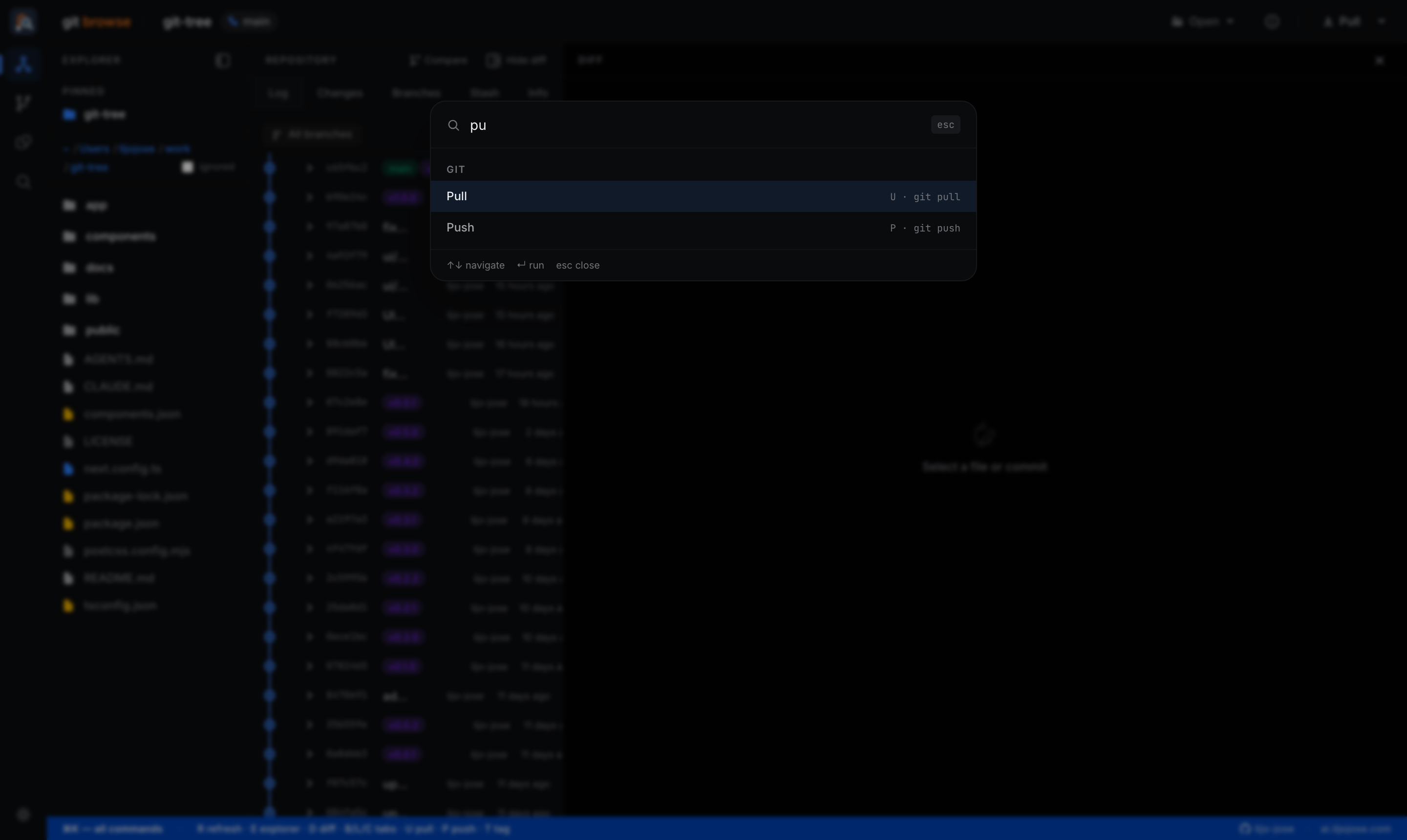
Press ⌘K anywhere
One searchable list of everything — navigation, git actions, tab switching, themes, recent repos — with keyboard hints inline. Every command shows its shortcut, so the palette teaches the fast path while being the fallback path. It doubles as the app's living documentation.
Command palette
Pull
Push
Create tag
Log tab
Changes tab
Branches tab
Stash tab
Toggle Explorer
Toggle Diff panel
Refresh
06
In depth
Read the series
Four Medium articles covering the build from initial commit to UX overhaul.
Part 1
I Built a Local Git GUI With Next.js — Meet Git Browse
What it is, why I built it, and a tour of the three-panel layout.
Part 2
A Full Day of Git Without Touching the Terminal
Commits, branches, rebases, stashes, tags, and the ahead/behind indicators.
Part 3
Diff Anything: Branches, Folders, Files, Even Your Clipboard
Git Browse's comparison toolkit and repo-wide search.
Part 4
From Crowded Toolbar to Command Palette: A UX Overhaul
How the activity rail, grouped actions, and ⌘K palette came together.
Part 5
The Explorer Grew Up, and So Did Everything Around It
Repository groups, live sync indicators, danger zone, and per-repo settings.
Open Source · MIT License
Point it at your messiest repo.
Around 3,500 lines of TypeScript — readable in an afternoon, forkable and hackable to your taste. Star it, file issues, or send a PR.